Saturday, 30 August 2025

Tearing bit into bits (C++)


A gist of vital questions/concepts related to Bit wise manipulation : 

  1. Turn off the first set bit(1) from right of a number N.
    1. Application: Fast Bit Count 
    2. Application: Single Number III
  2. Odd/Even test
  3. Get Kth bit of N / Checking if the Kth bit is set or unset: { bool bit_K = num & (1 << K); }
  4. Set Kth bit of N:  {num |= (1 << pos);}
  5. Unset Kth bit of N: {num &= (~(1 << pos));}
  6. Toggling a bit at Kth position: {num ^= (1 << pos);}
  7. Convert an integer (Decimal) into a bitwise (string) 
  8. Difference between '&' and '&&' or for that matter '|' and '||'
  9. Range of (a &b) , range of(a|b), range of (a^b) 

REMEBER the tools at our disposal are : 

  • SHIFT operators : >>(right shift, div by 2) and <<(left shift, mul by 2)
  • BOOL operators : ^ (XOR), &(and) , ~(NOT)
  • Arithmetic operators like +, - , /, * are not used. 

int int_var;
cout<<sizeof(int_var)<<endl; // returns number of bytes

output is  4 
this means an integer has 32 bits or 32 placeholders to hold either 1 or 0. 

1.Turn off the first set bit(1) of a number N.

Two ways : 

A. 

  • get ~N 
  • add +1
  • multiply this with N... log of this result will show the position of rightmost set bit
B
  • get (N-1)
  • flip the bit ~(N-1)
  • multiply this with N... log of this result will show the position of rightmost set bit
Fast Bit Count : 

```Java
count=0;
while(n>0) {
    n= n &(n-1);
    count++;
}
return count;
```

2. Check whether n is even or odd: The naive approach to check a number is even or odd is to take the modulo with 2. The better and efficient method is to take the (n&1). If the last bit is set n is odd, else even.

3. If you want the k-th bit of n, then do : 

(n & ( 1 << k )) >> k

(n >> k) & 1 is equally valid 


5. 
A&B =[0,min(A,B)] A^B =[0,A+B] A|B =[max(A,B),A+B]


TIPS : 
  •  mask = 0xffffffff  then ~(a^mask)


References : 


Sunday, 27 April 2025

[Graph] - DAG : An important observation

In a DAG, a mutually unreachable pair (s,t) can exist if and only if there exists at least one topological level with at least two nodes. 

Read the post at Notion : https://www.notion.so/DAG-Directed-Acyclic-Graph-1d8d32fa6ba880e7aea2d3eb59ad46e1

Sunday, 16 March 2025

Leetcode Weekly Contest 441 Q2. Closest Equal Element Queries

Q2. Closest Equal Element Queries

⭐Important learnings wrt ๐Ÿ”Circular Array๐Ÿ”  : 

 The two distances between elt at i & j  : 

  • forward_dist  = (j-i+n) % n;
  • backward_dist = (i-j+n) % n; 
How to get the two indexes `d` distance away from a given index, i ?
  • next_d_idx = ( i + d) % n ;
  • prev_d_idx = ( i - d + n) % n ;
As a special case when d=1, we can get next & prev elements as : 
  • next_idx = (i+1) % n 
  • prev_idx = (i-1+n ) % n
Alternatively, the +1 for forward should be thought as +(n-1) for backward or more generally, +d should be thought as +(n-d) when marching in backward direction.

Sunday, 9 March 2025

"Mastering Power Set Generation: A Deep Dive into Recursion” from a Java ☕ programmer’s perspective

Motivation for the notes :

  1. Leetcode#78. Subsets 
  2. G4G Power Set 

There are broadly two approaches :

  1. Bit Masking (iterative) ๐Ÿ˜ท{not focus of this blog}
  2. Backtracking (recursive) ⭐
    1. Include-Exclude paradigm : here we see two variants & why we should use one over other
    2. For-loop paradigm : prefer this (reason at the end)

Continue reading my latest blog compiled at notion.so by clicking here :  "Mastering Power Set Generation: A Deep Dive into Recursion” from a Java ☕ programmer’s perspective


Friday, 22 March 2024

SUNY Buffalo : MS Tracks and Specializations (Graphic Representation)

Graduate degree options provided by Departement of CSE at SUNY Buffalo can be graphically represented as : 


(Click on the images for enlarged view ๐Ÿ”)

The graphic representation of the semester wise breakdown of programm can be depicted as : 


Please comment below if you find anything wrong in the representations. Or, if you want to add more in this.


Thursday, 4 January 2024

LineRandomizer in Python : Utility Function

While Memorizing vocab for GRE, I decided to jumble up my word list in random order. This small python utility program helped me achieve that. Hope it helps you as well. 


'''
Author: Kunal Krishna
Date: 30/05/2023
'''

'''
Programme Purpose : Given a text file containing N lines,
    return a new file which has reorder those lines in random order.
    This has many utilities e.g. in memorizing a list of vocabulary.
Input: File1.text :
    >a
    >b
    >c
Output: File2.text : Random ordering
    >c
    >a
    >b
'''

import os
import re
import random
import numpy as np

# 1. Open file.txt : https://docs.python.org/3/library/functions.html#open
inpFile= open("D:\[win.kunal]\Desktop\Diff_Words.txt","r")
linesList = inpFile.readlines() #list of lines
# for line in linesList :
#     line = line.strip("\n")

# 2. Create an output file
resPath= "D:\my_codes\py_code\LineRandomizer"
resFileName = 'Difficult_Words.txt'
file_result = open(os.path.join(resPath,resFileName), "w") # w : creates/overrides existing
# alternatively
# file_result = open("Difficult_Words.txt", "w")

count = 0
# 3.Process the lines : randomize
while (len(linesList) > 0) :
    #chose a random word from the list
    random_word = np.random.choice(linesList)

    validWordExpression = "[~\*\#\w\s]"
    if( len(random_word.strip()) >0
            and re.match(validWordExpression, random_word) ) :
        # write the random word in the new file
        print(str(count+1)+". inserting..." + random_word.upper())
        file_result.write(random_word.upper())
        count +=1

    #also remove the word from linesList to avoid repetation
    linesList.remove(random_word)

# 4. Close the file
inpFile.close()
file_result.close()
if count>0 :  
    print(str(count)+" words inserted successfully!!!")
else :  
    print("No word(s) inserted.")

Tuesday, 28 November 2023

Creating Immutable Custom Class in Java

 A frequent Java interview question is : 

How to create a Class which is immutable? 

Like any other question, the answer begins with the understandig what do we really mean by the underlying concept - in this case : immutablity !!! 

Making a class immutable entails ensuring two solemn contracts : 

  1. Class is closed for extension i.e it cannot be inherited. (why is that necessary? ans at bottom)
  2. Once the object is created, the state of fields cannot chage till its existence in JVM.
In other words, A variable/class of an immutable type may only be changed by re-assigning to that variable. When we wish to only modify some portion of an immutable, we are compelled to reassign the whole object.

Let's take Student class as an example. 


This class can be made Immutable in following way (observe the Student class carefully) : 


KEY TAKEAWAYS : 
  1. finalize class 
  2. set class mebers as "private" and "final" 
  3. Assign new object to instance variable by copying all values 
  4. remove all setters() 
  5. return duplicate(new object) in getters() instead of actual instance variable

Finally answer to the question : Why do we need to declare an Immutable class final? 

Well the question is quite debatable. 

There are several reasons why we need to declare a class as final to make it immutable.
  1. To prevent subclasses from overriding methods and changing the state of the object.
    • If a class is not final, a subclass could override a method and change the state of the object. This would violate the principle of immutability, which states that the state of an object cannot be changed once it is created.
  2. To ensure that the object is thread-safe.
    • Immutable objects are thread-safe because they cannot be changed by multiple threads at the same time. This is important for objects that are shared between multiple threads, such as objects in a cache.
  3. To improve performance.
    • The JVM can make some optimizations for immutable objects, such as caching the hash code of the object. This can improve the performance of applications that use immutable objects.
  4. To make the code more readable and easier to understand.
    • Immutable objects are easier to reason about because their state cannot change. This makes the code more readable and easier to understand.

~ Happy Coding ~

Saturday, 28 October 2023

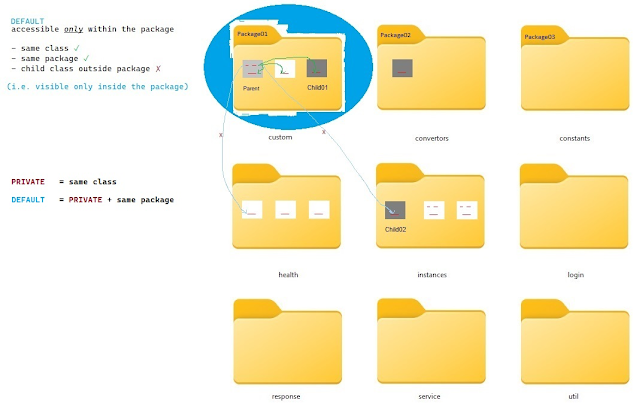
Pictorial Guide to understand Access Modifier in Java


Access Modifiers in Java has been explained beautifully in blogs like this. 

But this blog aims to leave a pictorial memory in reader's mind. 

Usually, it is represented in tabular form like this ... 


But I wanted to present even more practical schematic diagram. 


Private

Default (aka package-private)


Protected


Public


Saturday, 1 April 2023

Demistifying the enigma of negative numbers in programming

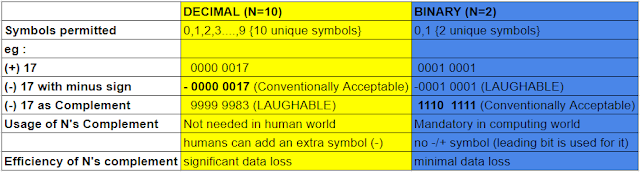
I came across this linkedin blog [How are negative numbers stored in binary?] [How the negative numbers are stored in memory? ] . These blogs provoked a related question : Why are 2's complement necessary at first place and why such systems are also not used for the quotidian Decimal system ? 

Negative numbers has alwyas been difficult to undertand reason being its vicarious nature - when your friend lends you green dollars you can touch it, feel it, grasp it, but when he asks back you cannot really "see" any money, unless you press hard on your memory. The negative number are particularly recondite when it comes to how computer deals with this "negativity". 

Let's revisit DECIMAL SYSTEM :

* only symbols, we call digits, permitted are : 0 to 9 (i.e. Ten symbols) 

* we can represent all WHOLE Numbers (0,1,2,3...∞) using only these 10 symbols and their infinite jumbling combinations. (read Permutaions & Combinations). 

At this point, Primates had no idea about what "-54" meant ? They logged informations like "The bald Primate owes 50 rice grains to the hirsute Primate ". But as much water has flowed under the bridge some primate suggested why not replace "owed" with yet another symbol with, say, "-".

* Therefore, inorder to represent INTEGERS (-∞,...-3,-2,-1,0,1,2,3 ...) we agreed to use an additional symbol "-"


So, the Decimal system(0-9) is easy because we have made it easier by borrowing extra symbol of (-)ve.  

Before we strike the pith of  the blog title, bear me to answer this qustion : 

How could we have written/represented negative numbers if you were not permitted to use an extra symbol like "-" ? 

Let me rephrase question : "How will you write -7 without using (-) symbol in decimal system?" [Constraint: you can use any digit (0-9) for maximum 4 times as in 8764]

(why I have limited to 4 digits in this excercise? Because unlike when wrting on paper, in computer the size is limited based on data type - for example, an integer is stored in 32 bits)

Propsed Solution: 

We have to find B such that A + B = 0 

A = 7 = 0007 (represented as 4 digit) 

Step I : now take 9's complement* = 9999-0007 = 9992 [DEFINITION: 9's complement of A = highest number possible - A]

Step II: Add 1 : 9993 (This is B i.e. -7) [10's complement of A]

Lets verify : A + B = 0007 + 9993 = 1 0000 = 0000 (discard the leading 1 because we can only use 4 digits)

Agreeing to Agree on somethings is at the cornerstone of any system we devise to ease our transactions. What we have implictly agreed above is that if the left most symbol will be of highest value out of 10 symbols(i.e. 9) then it will represent negative number. And if the left most symbol is of the lowest value out of 10 symbols (i.e 0) then it will represent positive number. 

Then obvious counter question will be : how can we represent a number greater than 8999 , say 9000 using above agreement? Won't this 9000 be actually representing : positive 1000 

Let A = 1000

 I. 9999 - 1000 = 8999 (9's complement of 1000)

II. 8999 + 1    = 9000 (10's complement of 1000)

The answer is no, 9000 = -1000. Because for 4 spaces we cannot represent (positive) number greater than 8999. Why? Because of our prior tacit agreement about TRADEOFF between RANGE & SIGN. 

either, you can represent 10 thousand WHOLE Numbers from 0000 to 9999

or, you can represent 999 negative integers(9001to999) & 999 positive integers(0001to0999) and one zero (9000 or 0000). Total numbers = 1999 The leading number will act as sign indicator. Such drastic fall in range because one space, the leftmost space, which could have hold 10 information is used to present only two infromation (+/-). 


Now, Enter the world of BINARY SYSTEM : 

* only two symbols: 0 and 1 are permitted.

In the Binary system, at the machine level we dont have luxury of adding (-ve) symbol. Everything is black(0) & white(1) - either 0 or 1. (unless you are using quantum computer). 

So early programmers have devised an igenious way(already explained above) to overcome this scarcity. 

A = 7 is represented in binary (8-bit) as  0000 1101

Step I : 1's complement of A : (highest no possible - A) = 1111 1111 - 0000 1101 = 1111 0010

Step II: 2's complement of A :   1's complement + 1 = 1111 0010 +1 = 1111 0011

Verify : 0000 1101 + 1111 0011 =  1 0000 0000 = 0000 0000 (leading 1 will be discarded for 8-bit)


PS: the range loss in binary system is much lesser compared to decimal system . Hence it made sense to use above representation in binary systems. 

Capacity reducation for 4 spaces if we store negative numbers : 

1. Decimal system : 10,000 --> 2000 (1000 postive , 1000 negative) : 5x loss

2. Binary system :  16 (0000 to 1111) --> 15(1111/-7 to 0 to 0111/+7) - hardly any loss
Thanks. 

Thursday, 9 March 2023

Google Sheet + Apps Script : Day03 (Removes blank Cells in a column consisting of hyperlinked strings)


Turns a spaced column into a compressed one :

many blank cells in between ==>blank cols removed

function removeEmptyCellsInColumn() {

  var ss = SpreadsheetApp.getActiveSpreadsheet();
  var sheet = ss.getSheets()[0];

    var start=130;
    var last=300;

    var i=start;
    var j=i+1;

    var rangeCut,rangePaste;
    var a_i;
    var a_j =sheet.getRange(j,2).getValue()

    while(j<last){
        if(a_j !== "") {// if a[j] isNOTempty //a[i+1] =a[j];
          rangePaste = sheet.getRange(i+1,2); //pulls up next val in  next contiguous empty col
          rangeCut =sheet.getRange(j,2);
          a_i =sheet.getRange(i,2).getValue();
          
          var richValue = SpreadsheetApp.newRichTextValue()
                        .setText(a_j)
                        .setLinkUrl(sheet.getRange(j,2).getRichTextValue().getLinkUrl())
                        .build();
          rangePaste.setRichTextValue(richValue); //paste at a[i]
          i++;
          rangeCut.clear();//clears or cuts the a[j]
        }
        j++; 
        a_j =sheet.getRange(j,2).getValue();
      }
}

Google Sheet + Apps Script : Day02(Removes/Blanks Cell containing Digit/Number)


This code helps remove all numbers in 3rd column of third sheet in a SpreadSheet.


function numberRemoverFromColumn() {
  var ss = SpreadsheetApp.getActiveSpreadsheet();
  var sheet = ss.getSheets()[2];
  //  var sheet = ss.getSheetByName("SheetName"); 
 
 var row=1;
  var startRowAt=2; //starting row
  var endRowAt=2192;//last row

  for ( row=startRowAt; row<endRowAt; row++ ) {
    var range = sheet.getRange(row,3);
    var presentCellValue =range.getValues(); //=values[0][0];
      if(presentCellValue%2===0 || presentCellValue%2===1){
        Logger.log(presentCellValue+" will be blanked now");
        var richValue = SpreadsheetApp.newRichTextValue()
                        .setText("")
                        .build();
        range.setRichTextValue(richValue)
      }
  }
}


Google Sheet + Apps Script : Day1

Created a program to change each strings containing cells of first column into hyperlinks redirecting to itself : 

function selfRefrencingHyperlinkMaker() {

  var ss = SpreadsheetApp.getActiveSpreadsheet();
  var sheet = ss.getSheets()[1];
  //  var sheet = ss.getSheetByName("SheetName"); 
  var row;
  var startRowAt=2;
  var endRowAt=150;
  for ( row =startRowAt; row<endRowAt; row++ ) {
    var range = sheet.getRange(row,1);
    var values = range.getValues();
      if(values[0][0].length >0){
        var richValue = SpreadsheetApp.newRichTextValue()
                        .setText(values)
                        .setLinkUrl("#gid="+sheet.getSheetId()+"&range=A"+row)
                        .build();
        range.setRichTextValue(richValue)
      }
  }
}

Saturday, 28 January 2017

How to clean up workspace after compiling and running C/C++ programs in windows

Hi Cpp Programmers,

If you are tired of removing the *.o and *.exe files generated after compiling and running c/cpp files then you have come to right place.

This blog explains how to remove such files in Windows Platform. Later script for Linux version will also be added.

Suppose you have a parent directory called MyCppCodeRepo within which you might have children directory e.g. LinkedList, Trees, etc.

Here are the steps :


  1. Go to MyCppCodeRepo e.g. D:/myfile/MyCppCodeRepo/
  2. Create a file cleanUp.txt.
  3. Paste the following code : del /S *.o *.exe
  4. (OPTIONAL) If you want to see the logs (i.e which files are being deleted) add an additional line pause .
  5. Save and Exit.
  6. Rename the file to cleanUp.bat . This transforms the text file to a batch file.
  7. Now whenever you want to delete files of type *.o and *.exe in the current directory or any nested folder just double click it.


Explanation : del : deletes file supplied to it.
                      /S   : looks for nested folder (recursively)
                     *.o and *.exe : * is for file name of any length. .o and .exe file types which we want to delete 


You can copy and paste this small batch file in any directory and remove the desired file types. Suppose, after few months you start Java Programming then compiling Java files (*.java) generates java bytecodes which have *.class extension. If you want to delete these class files then just append *.class in line 3 of above steps.

Git provide .gitignore for this specific purpose - to exclude such binaries and other files generated at compile time. But writing your scripts to achieve these small tasks has its own satisfaction. Hope it helps you in keeping your work-space clean.

HAPPY PROGRAMMING. 

Understanding the immutable nature of java.lang.String

public class ImmutableStringDemo {

public static void main(String[] args) {

String sl = "First Name";  // a string literal
String so = new String("First Name"); // a string object
StringBuffer sb = new StringBuffer("First Name"); // a stringBuffer object


System.out.println("s1 = " + sl + " hashCode = "+ mimicObjectToString(sl));
sl += "Kumar"; // appended ,
System.out.println("s1 = " + sl + " hashCode = "+ mimicObjectToString(sl)+ "\n");
// if the output differs it means a new reference has been created during appending

System.out.println("so = " + so + " hashCode = "+ mimicObjectToString(so));
so += "Kumar";
System.out.println("so = " + so + " hashCode = "+ mimicObjectToString(so)+ "\n");

System.out.println("sb = " + sb + " hashCode = "+ mimicObjectToString(sb));
sb.append("Kumar");
System.out.println("sb = " + sb + " hashCode = "+ mimicObjectToString(sb)+ "\n");

System.out.println("Changed hashCode denotes different reference has been created, making it \"immutable\"");
}

public static String mimicObjectToString(Object o)
    {
        //prevent a NullPointerException by returning null if o is null
        String result = null;
        if (o !=null)
        {
            result = o.getClass().getName() + "@" + Integer.toHexString(System.identityHashCode(o));
        }
        return  result;
    }
}
 
Click here for running code : https://ideone.com/llyFaU  

Oracle docs defines StringBuffer as "A thread-safe, mutable sequence of characters"

Thursday, 2 October 2014

Exploring Integer - the wrapper class for primitive int

Try `==` and `equals()` for Integer


  1. public class IntegerClass {

  2. public static void main(String[] args) {

  3. Integer i1 = 11;
  4. Integer i2 = 11;
  5. if(i1 == i2){
  6. System.out.println("i1 == i2");
  7. }
  8. if(i1.equals(i2)){
  9. System.out.println("i1.equals(i2)");
  10. }
  11. /* * * * * * * * * * * * * * * * * * * * * */
  12. Integer i3 = 128;
  13. Integer i4 = 128;
  14. if(i3 == i4){
  15. System.out.println("i3 == i4");
  16. }else{
  17. System.out.println("i3 != i4");
  18. }
  19. /* * * * * * * * * * * * * * * * * * * * * */
  20. if(i3.equals(i4)){
  21. System.out.println("i3.equals(i4)");
  22. }else{
  23. System.out.println("!(i3.equals(i4))");
  24. }
  25. }
  26. }
Line 5 will be actually compiled as Iinteger.valueOf(11)
Thanks to compiler which actually autoboxes primitive values to corresponding wrapper classes.